How-To Guide
How To: Share a Contact (and What Stays Private)
Passing along a contact — the plumber your neighbor asked about, the sitter your friend wants to book — doesn't mean forwarding everything your family knows about that person and kept notes about. When you share from KeeperCircle, only the shareable basics go out.
What gets shared, and what does not
A shared contact includes the base information: name, phone, email, address, and the like.
What's not included:
- Private notes — your household's notes stay within your household and are not shared.
- Contact history — the record of your family's interactions stays private.
- Medical and allergy details — these appear only on an emergency sheet, and only when you explicitly choose to include them there. They are never part of a share.
You don't have to strip anything out before sharing — the private layers are excluded automatically.
Step 1: Open the contact and choose Share
- Open the contact you want to pass along.
- Choose Share.

Step 2: Review what will go out
The share dialog shows exactly what the other person will receive — the base contact info, nothing more. What you see in the dialog is the whole share.
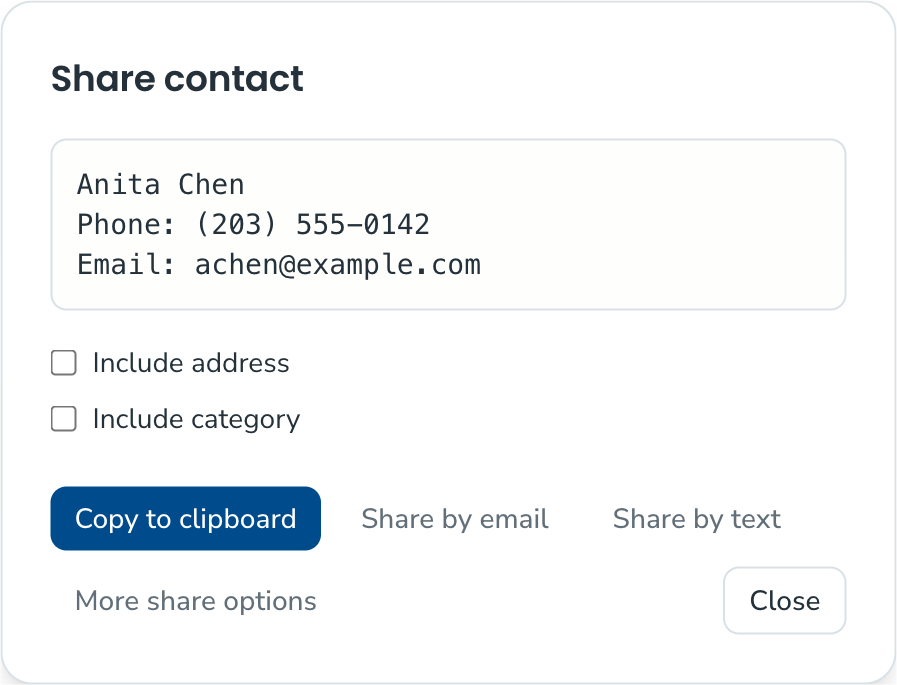
Step 3: Copy and send
Copy the shareable contact and paste it wherever the conversation is happening — a text, an email, a group chat. The recipient doesn't need a KeeperCircle account to receive it.
Good to know
- Sharing sends a copy of the info as it stands right now. If the contact's number changes later, the copy you sent doesn't update.
- To give someone ongoing, live access to your household's contacts instead of a one-off copy, see How To: Give a Caregiver View-Only Access.