
The Activities Roster: Coaches, Teams, and Season Turnover
Kids' activities create and expire contacts on a schedule. How to capture a season's roster, run it smoothly, and retire it cleanly when it ends.
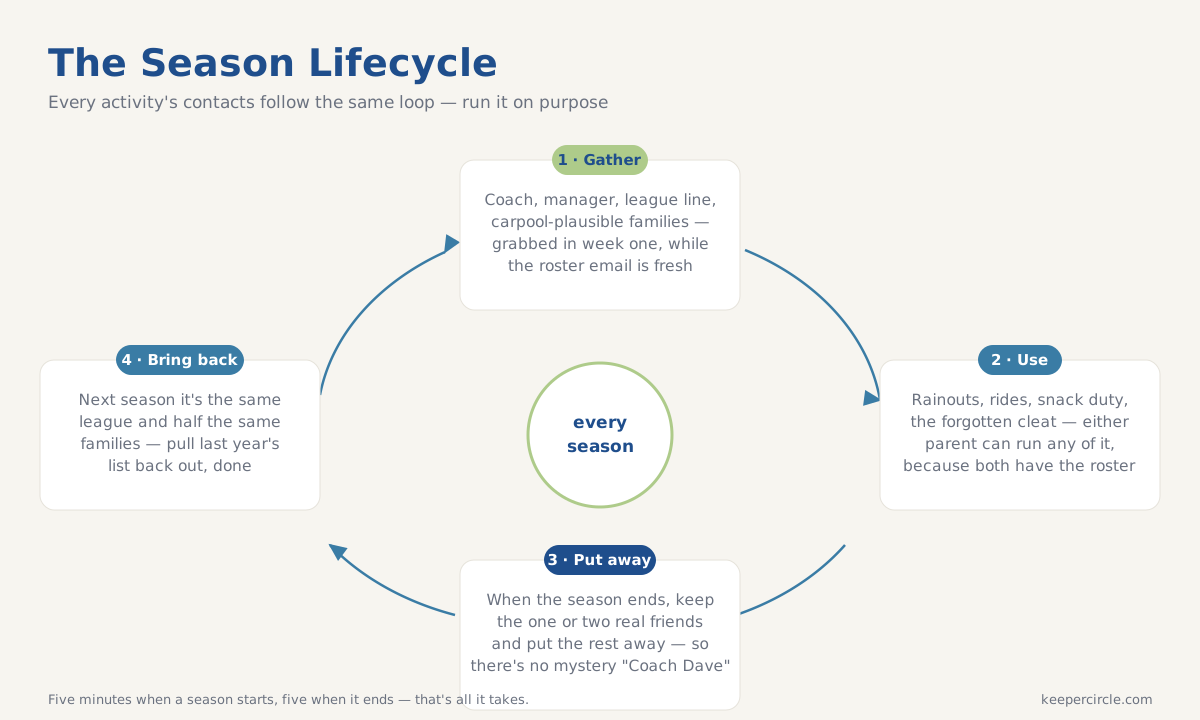
Every kids' activity follows the same contact lifecycle. A season starts and a small burst of new people enters your family's life. The coach, the assistant coach, the team manager, the facility, and a dozen teammates' families. For ten weeks these people matter intensely. Practice moves, games get rained out, someone needs a ride, snack duty rotates. Then the season ends, and the entire cluster goes dormant overnight.
Phones handle this lifecycle terribly, which is why every parent's contact list contains the sediment of seasons past. "Coach Dave" from a sport you can't remember, "Tyler soccer mom" from which Tyler, which soccer, which year. Activities deserve a system that matches their rhythm. Capture at the start, use all season, retire at the end.
Season start: the capture window
Like school in September, an activity's first two weeks deliver everything. Grab it while it's flowing:
Advertisement
Ads support the free tier. Paid households are ad-free.
- The coach or instructor, with cell and email, plus their communication preference and the app the team uses, if any.
- The team manager or parent coordinator, who in most leagues is the person who actually knows things.
- The organization layer. League office, facility front desk, and the weather or cancellation line, which is the number you'll want at 7:40am on a drizzly Saturday.
- Teammates' families, especially any carpool candidates, captured with the connection ("Dana, Ruby's mom, #14"). The roster email is your best source, since it links kids to parents in writing.
- The schedule facts that behave like contacts. Practice location and times, and where the games happen. Not phone numbers, but they belong in the same findable place, because half of activity questions are "where is it again?"
Mid-season: what the roster does for you
A captured roster pays out in small denominations all season. The rained-out game gets confirmed with one call to the weather line instead of a group-chat archaeology dig. The forgotten cleat gets solved because you can reach a teammate family near the field. The ride emergency gets handled by whichever parent is free, because both of you have the roster, not just the one who attended the parent meeting. And when the coach changes practice time via a message one parent saw and the other didn't, the shared notes catch what the group chat dropped.
Season end: the retire step
This is the part nobody does, and it's the part that keeps a contact list trustworthy. When the season ends, spend five minutes closing it out. Decide which teammate families crossed from roster to real, since a season usually produces one or two genuine friendships, and those get promoted to your household's permanent list. Then archive the rest of the cluster as a set. The coach, the league, the families you liked fine but won't see until, maybe, next season. Archived rather than deleted, because next season might bring the same league, the same coach, and half the same families back, and restoring a cluster beats rebuilding one.
What you don't do is leave the season's contacts sitting in your active list forever, which is how "Coach Dave" fossils form.
The multi-kid, multi-season reality
One kid, one activity is manageable by hand. Two kids in five activities across three seasons is a system problem, and it's exactly the shape of problem a shared household contact list handles well. In KeeperCircle, each season lives as a list. The fall soccer list holds its coach, league, and families, connected to the right child, with notes both parents see. During the season, either parent runs any logistics. At season's end, the list archives in one motion, and when spring soccer arrives, last year's cluster is a restore away. The activity churn keeps happening, because that's what childhood is, but it stops leaving sediment.
The five-minute version
New season starting? Capture the coach, the manager, the cancellation line, and two carpool-plausible families, connected to your kid. Season ending? Promote the keepers, archive the cluster. That's the whole system, and it's five minutes on each end of a season. Somewhere, Coach Dave finally gets to rest.